개요
컴포지트(Composite) 패턴은 객체들을 트리 구조로 구성하여 부분-전체 계층을 표현하는 패턴입니다. 이 패턴은 클라이언트가 단일 객체와 복합 객체를 동일하게 처리할 수 있도록 해줍니다. 주로 객체들이 부분-전체 계층 구조를 형성할 때 사용됩니다.
“전체는 부분의 합보다 크다”
컴포지트(Composite) 패턴 다음과 같은 상황에서 사용됩니다:
- 부분-전체 계층 구조를 표현해야 할 때: * 예를 들어, 그래픽 애플리케이션에서 개별 도형(Leaf)과 도형 그룹(Composite)을 트리 구조로 구성할 수 있습니다. 클라이언트는 단일 도형과 도형 그룹을 동일하게 처리할 수 있음
- 객체들이 단일 객체와 복합 객체로 구성될 때: * 예를 들어, 파일 시스템에서 파일(Leaf)과 디렉토리(Composite)를 트리 구조로 구성할 수 있습니다. 클라이언트는 파일과 디렉토리를 동일한 인터페이스를 통해 접근할 수 있음
- 클라이언트가 개별 객체와 복합 객체를 동일하게 다루어야 할 때: * 예를 들어, 사용자 인터페이스 라이브러리에서 개별 위젯(Leaf)과 위젯 컨테이너(Composite)를 동일한 방식으로 처리할 수 있고, 클라이언트는 개별 위젯과 위젯 컨테이너를 동일한 방식으로 조작할 수 있음
- 객체들이 재귀적인 구조를 가질 때: * 예를 들어, 조직도에서 직원(Leaf)과 부서(Composite)를 트리 구조로 구성할 수 있습니다. 부서는 다른 부서와 직원을 자식으로 가질 수 있으며, 클라이언트는 조직도를 재귀적으로 탐색할 수 있음
장점
- 단순화된 클라이언트 코드: * 클라이언트는 개별 객체(Leaf)와 복합 객체(Composite)를 동일하게 처리할 수 있으며 이는 클라이언트 코드의 복잡성을 줄이고 가독성 좋음
- 유연성: * 객체를 트리 구조로 자유롭게 추가하고 제거할 수 있고 새로운 유형의 Leaf와 Composite 객체를 쉽게 추가할 수 있어 시스템의 확장성을 좋음
- 재귀적 구성: * 복합 객체 안에 또 다른 복합 객체를 포함할 수 있어 객체의 재귀적 구성이 가능하며 이를 통해 복잡한 계층 구조를 효과적으로 관리할 수 있음
- 일관된 인터페이스: * Component 인터페이스를 통해 개별 객체와 복합 객체가 동일한 작업을 수행하도록 강제함으로써 일관성을 유지할 수 있음
- 객체의 다형성: * 클라이언트가 단일 객체와 복합 객체를 동일한 방식으로 다룰 수 있으므로 다형성을 활용한 유연한 코딩이 가능함
단점
- 구현의 복잡성: * 트리 구조가 깊어지고 복잡해질수록 관리와 구현이 어려워질 수 있고 특히, Composite 객체가 많아지면 구조를 파악하기 어려워질 수 있음
- 공통 인터페이스의 제한: * 모든 객체가 공통 인터페이스를 구현해야 하기 때문에 일부 객체가 불필요한 메서드를 구현해야 할 수도 있으며 이는 설계의 유연성을 제한할 수 있음
- 객체 식별의 어려움: * 클라이언트가 개별 객체와 복합 객체를 구분하지 않고 동일한 방식으로 처리하기 때문에, 특정 객체를 식별하거나 특수한 처리를 수행하기 어려울 수 있음
- 성능 문제: * 복합 객체가 많아질수록 트리 구조를 탐색하는 데 시간이 더 많이 소요될 수 있으며, 특히, 깊은 트리 구조에서 성능 문제가 발생할 수 있음
예시 코드 : 그래픽 객체(도형)들을 트리 구조로 구성
// Component 인터페이스
interface Graphic {
    void draw();
    void move(int x, int y);
}

// Leaf 클래스 - Circle
class Circle implements Graphic {
    private int x, y, radius;

    public Circle(int x, int y, int radius) {
        this.x = x;
        this.y = y;
        this.radius = radius;
    }

    @Override
    public void draw() {
        System.out.println("Drawing Circle at (" + x + ", " + y + ") with radius " + radius);
    }

    @Override
    public void move(int x, int y) {
        this.x += x;
        this.y += y;
        System.out.println("Moved Circle to (" + this.x + ", " + this.y + ")");
    }
}

// Leaf 클래스 - Rectangle
class Rectangle implements Graphic {
    private int x, y, width, height;

    public Rectangle(int x, int y, int width, int height) {
        this.x = x;
        this.y = y;
        this.width = width;
        this.height = height;
    }

    @Override
    public void draw() {
        System.out.println("Drawing Rectangle at (" + x + ", " + y + ") with width " + width + " and height " + height);
    }

    @Override
    public void move(int x, int y) {
        this.x += x;
        this.y += y;
        System.out.println("Moved Rectangle to (" + this.x + ", " + this.y + ")");
    }
}

import java.util.ArrayList;
import java.util.List;

// Composite 클래스
class CompositeGraphic implements Graphic {
    private List<Graphic> childGraphics = new ArrayList<>();

    public void add(Graphic graphic) {
        childGraphics.add(graphic);
    }

    public void remove(Graphic graphic) {
        childGraphics.remove(graphic);
    }

    @Override
    public void draw() {
        for (Graphic graphic : childGraphics) {
            graphic.draw();
        }
    }

    @Override
    public void move(int x, int y) {
        for (Graphic graphic : childGraphics) {
            graphic.move(x, y);
        }
    }
}

public class CompositePatternDemo {
    public static void main(String[] args) {
        // Leaf 객체들 생성
        Graphic circle1 = new Circle(10, 10, 5);
        Graphic circle2 = new Circle(20, 20, 10);
        Graphic rectangle1 = new Rectangle(30, 30, 15, 20);
        Graphic rectangle2 = new Rectangle(40, 40, 30, 40);

        // Composite 객체 생성
        CompositeGraphic composite1 = new CompositeGraphic();
        CompositeGraphic composite2 = new CompositeGraphic();

        // Leaf 객체들을 Composite 객체에 추가
        composite1.add(circle1);
        composite1.add(rectangle1);

        composite2.add(circle2);
        composite2.add(rectangle2);
        composite2.add(composite1); // Composite 객체를 다른 Composite 객체에 추가

        // 전체 트리를 그리기
        System.out.println("Initial drawing:");
        composite2.draw();

        // 전체 트리를 이동하기
        System.out.println("\nMoving all graphics by (10, 10):");
        composite2.move(10, 10);

        // 이동 후 다시 그리기
        System.out.println("\nDrawing after moving:");
        composite2.draw();
    }
}
코드 구성 설명
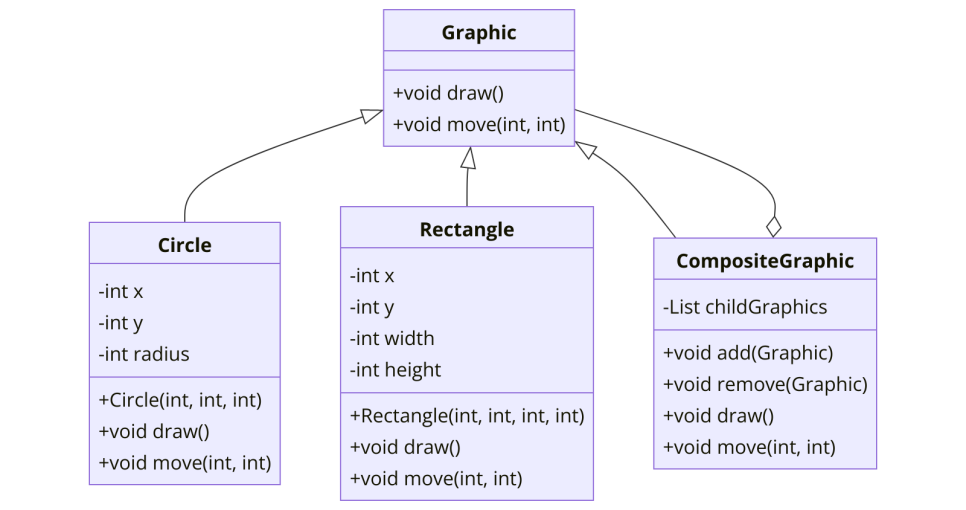
- Component 인터페이스 (Graphic): 모든 그래픽 객체가 구현해야 하는 draw와 move 메서드를 정의
- Leaf 클래스 (Circle 및 Rectangle): 각 그래픽 객체는 위치와 크기 정보를 가지고 있으며, draw와 move 메서드를 구현
- Composite 클래스 (CompositeGraphic): 자식 그래픽 객체들을 포함하는 복합 객체입니다. add 및 remove 메서드를 통해 자식 객체들을 관리하며, draw와 move 메서드를 통해 모든 자식 객체의 메서드를 호출
- 클라이언트 코드: CompositePatternDemo 클래스의 main 메서드에서 그래픽 객체들을 구성하고, 트리 구조를 통해 객체들을 그리거나 이동
관련 패턴
- 디코레이터(Decorator) 패턴: * 디코레이터 패턴은 객체에 동적으로 새로운 기능을 추가하기 위해 객체를 감싸는 구조를 사용하며, 컴포지트 패턴과 마찬가지로 재귀적 합성 구조를 통해 객체를 구성하며, 두 패턴 모두 동일한 인터페이스를 구현하는 객체들을 재귀적으로 포함할 수 있
- 빌더(Builder) 패턴: * 빌더 패턴은 복잡한 객체의 생성 과정을 단계별로 캡슐화하여 생성하는 패턴으로, 컴포지트 패턴으로 구성된 복잡한 객체를 빌더 패턴을 사용하여 단계적으로 생성할 수 있고 이는 특히 컴포지트 패턴으로 구성된 트리 구조 객체를 유연하게 생성하는 데 유용함
- 플라이웨이트(Flyweight) 패턴: * 플라이웨이트 패턴은 다수의 작은 객체를 효율적으로 공유하여 메모리 사용을 최적화하는 패턴으로, 컴포지트 패턴으로 구성된 객체들이 많을 때 동일한 부분을 공유하여 메모리 낭비를 줄이는 데 사용됨
- 프록시(Proxy) 패턴: * 프록시 패턴은 다른 객체에 대한 접근을 제어하기 위해 대리자 객체를 사용하는 패턴으로, 컴포지트 패턴에서 복합 객체에 대한 접근을 제어하거나 지연 초기화를 구현할 때 유용하게 사용될 수 있고 프록시 객체는 실제 객체를 대체하여 클라이언트와 실제 객체 간의 상호작용을 관리함
- 브리지(Bridge) 패턴: * 브리지 패턴은 구현과 추상을 분리하여 각각 독립적으로 변형할 수 있도록 하는 패턴으로, 컴포지트 패턴과 함께 사용하여 객체의 계층 구조와 구현을 분리하고, 두 부분이 독립적으로 변경될 수 있도록 합니다. 이는 특히 복합 객체의 다양한 구현이 필요할 때 유용함
- 책임 연쇄(Chain of Responsibility) 패턴: * 책임 연쇄 패턴은 요청을 처리할 수 있는 객체들의 체인을 만들어, 각 객체가 요청을 처리하거나 다음 객체로 전달하는 패턴으로, 컴포지트 패턴의 계층 구조에서 요청을 처리하는 객체들을 연결하여 트리 구조를 따라 요청을 전달하고 처리할 때 유용하게 사용될 수 있음
관련 패턴을 이용한 예시:
컴포지트 패턴과 함께 디코레이터 패턴, 플라이웨이트 패턴, 그리고 프록시 패턴을 사용하여 복잡한 그래픽 시스템을 구현
// Component 인터페이스
interface Graphic {
    void draw();
    void move(int x, int y);
}

// Leaf 클래스 - Circle
class Circle implements Graphic {
    private int x, y, radius;

    public Circle(int x, int y, int radius) {
        this.x = x;
        this.y = y;
        this.radius = radius;
    }

    @Override
    public void draw() {
        System.out.println("Drawing Circle at (" + x + ", " + y + ") with radius " + radius);
    }

    @Override
    public void move(int x, int y) {
        this.x += x;
        this.y += y;
        System.out.println("Moved Circle to (" + this.x + ", " + this.y + ")");
    }
}

// Leaf 클래스 - Rectangle
class Rectangle implements Graphic {
    private int x, y, width, height;

    public Rectangle(int x, int y, int width, int height) {
        this.x = x;
        this.y = y;
        this.width = width;
        this.height = height;
    }

    @Override
    public void draw() {
        System.out.println("Drawing Rectangle at (" + x + ", " + y + ") with width " + width + " and height " + height);
    }

    @Override
    public void move(int x, int y) {
        this.x += x;
        this.y += y;
        System.out.println("Moved Rectangle to (" + this.x + ", " + this.y + ")");
    }
}

import java.util.ArrayList;
import java.util.List;

// Composite 클래스
class CompositeGraphic implements Graphic {
    private List<Graphic> childGraphics = new ArrayList<>();

    public void add(Graphic graphic) {
        childGraphics.add(graphic);
    }

    public void remove(Graphic graphic) {
        childGraphics.remove(graphic);
    }

    @Override
    public void draw() {
        for (Graphic graphic : childGraphics) {
            graphic.draw();
        }
    }

    @Override
    public void move(int x, int y) {
        for (Graphic graphic : childGraphics) {
            graphic.move(x, y);
        }
    }
}

// Decorator 클래스
abstract class GraphicDecorator implements Graphic {
    protected Graphic decoratedGraphic;

    public GraphicDecorator(Graphic decoratedGraphic) {
        this.decoratedGraphic = decoratedGraphic;
    }

    @Override
    public void draw() {
        decoratedGraphic.draw();
    }

    @Override
    public void move(int x, int y) {
        decoratedGraphic.move(x, y);
    }
}

// Concrete Decorator 클래스
class ColorDecorator extends GraphicDecorator {
    private String color;

    public ColorDecorator(Graphic decoratedGraphic, String color) {
        super(decoratedGraphic);
        this.color = color;
    }

    @Override
    public void draw() {
        decoratedGraphic.draw();
        System.out.println("Applying color: " + color);
    }
}

import java.util.HashMap;
import java.util.Map;

// Flyweight Factory 클래스
class GraphicFactory {
    private static final Map<String, Graphic> graphics = new HashMap<>();

    public static Graphic getCircle(int x, int y, int radius) {
        String key = "Circle:" + radius;
        if (!graphics.containsKey(key)) {
            graphics.put(key, new Circle(x, y, radius));
        }
        return graphics.get(key);
    }

    public static Graphic getRectangle(int x, int y, int width, int height) {
        String key = "Rectangle:" + width + ":" + height;
        if (!graphics.containsKey(key)) {
            graphics.put(key, new Rectangle(x, y, width, height));
        }
        return graphics.get(key);
    }
}

// Proxy 클래스
class GraphicProxy implements Graphic {
    private Graphic realGraphic;
    private String graphicType;
    private int x, y, dimension1, dimension2;

    public GraphicProxy(String graphicType, int x, int y, int dimension1, int dimension2) {
        this.graphicType = graphicType;
        this.x = x;
        this.y = y;
        this.dimension1 = dimension1;
        this.dimension2 = dimension2;
    }

    private void initializeRealGraphic() {
        if (realGraphic == null) {
            if (graphicType.equalsIgnoreCase("Circle")) {
                realGraphic = new Circle(x, y, dimension1);
            } else if (graphicType.equalsIgnoreCase("Rectangle")) {
                realGraphic = new Rectangle(x, y, dimension1, dimension2);
            }
        }
    }

    @Override
    public void draw() {
        initializeRealGraphic();
        realGraphic.draw();
    }

    @Override
    public void move(int x, int y) {
        initializeRealGraphic();
        realGraphic.move(x, y);
    }
}
public class CompositePatternDemo {
    public static void main(String[] args) {
        // Leaf 객체들 생성
        Graphic circle1 = GraphicFactory.getCircle(10, 10, 5);
        Graphic circle2 = GraphicFactory.getCircle(20, 20, 10);
        Graphic rectangle1 = GraphicFactory.getRectangle(30, 30, 15, 20);
        Graphic rectangle2 = GraphicFactory.getRectangle(40, 40, 30, 40);

        // Proxy 객체 생성
        Graphic proxyCircle = new GraphicProxy("Circle", 50, 50, 20, 0);
        Graphic proxyRectangle = new GraphicProxy("Rectangle", 60, 60, 40, 50);

        // Composite 객체 생성
        CompositeGraphic composite1 = new CompositeGraphic();
        CompositeGraphic composite2 = new CompositeGraphic();

        // Leaf 객체들을 Composite 객체에 추가
        composite1.add(circle1);
        composite1.add(rectangle1);

        composite2.add(circle2);
        composite2.add(rectangle2);
        composite2.add(proxyCircle);
        composite2.add(proxyRectangle);
        composite2.add(composite1); // Composite 객체를 다른 Composite 객체에 추가

        // Decorator 적용
        Graphic decoratedComposite = new ColorDecorator(composite2, "Red");

        // 전체 트리를 그리기
        System.out.println("Initial drawing:");
        decoratedComposite.draw();

        // 전체 트리를 이동하기
        System.out.println("\nMoving all graphics by (10, 10):");
        decoratedComposite.move(10, 10);

        // 이동 후 다시 그리기
        System.out.println("\nDrawing after moving:");
        decoratedComposite.draw();
    }
}
코드 설명
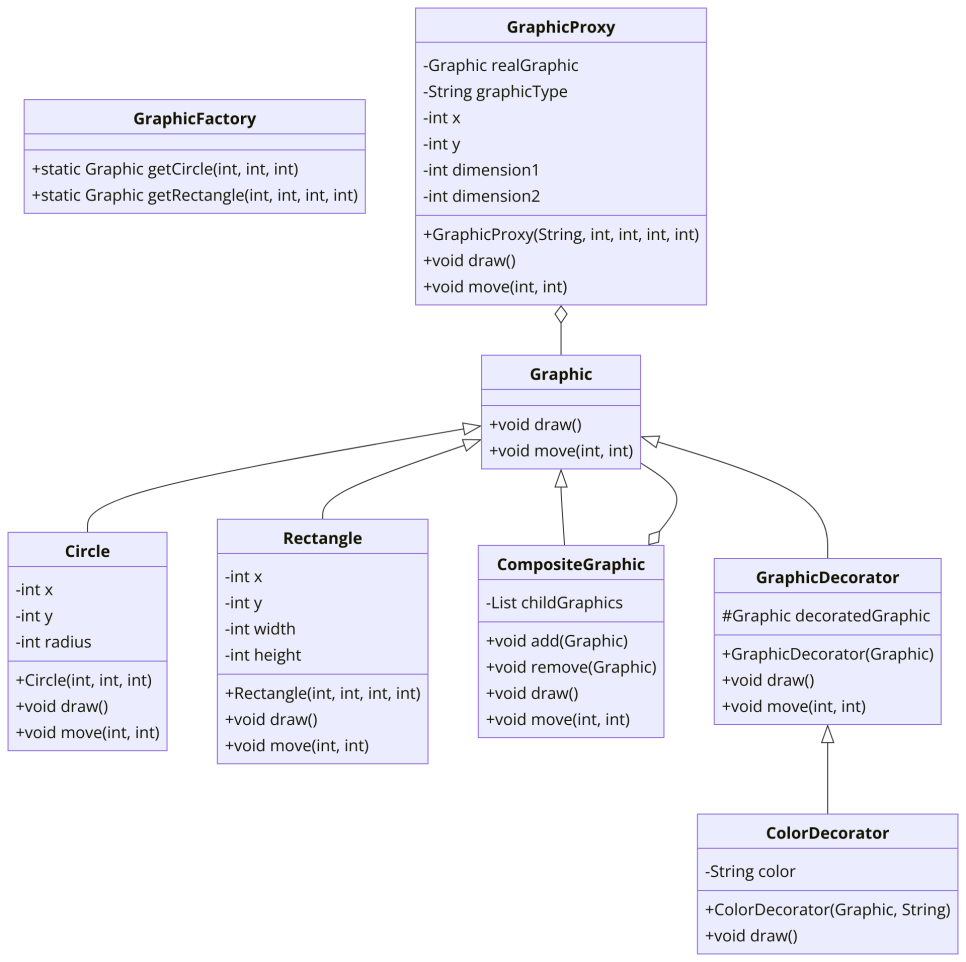
- Component 인터페이스 (Graphic): 모든 그래픽 객체가 구현해야 하는 draw와 move 메서드를 정의
- Leaf 클래스 (Circle 및 Rectangle): 각 그래픽 객체는 위치와 크기 정보를 가지고 있으며, draw와 move 메서드를 구현
- Composite 클래스 (CompositeGraphic): 자식 그래픽 객체들을 포함하는 복합 객체입니다. add 및 remove 메서드를 통해 자식 객체들을 관리하며, draw와 move 메서드를 통해 모든 자식 객체의 메서드를 호출
- Decorator 패턴: GraphicDecorator와 ColorDecorator 클래스를 통해 객체에 동적으로 새로운 기능을 추가
- Flyweight 패턴: GraphicFactory 클래스를 통해 동일한 객체를 공유하여 메모리 사용을 최적화
- Proxy 패턴: GraphicProxy 클래스를 통해 객체 생성 지연 및 접근 제어를 구현
- 클라이언트 코드: 다양한 패턴을 조합하여 복잡한 그래픽 객체 구조를 구성하고, 트리 구조를 통해 이들을 효율적으로 관리하고 조작