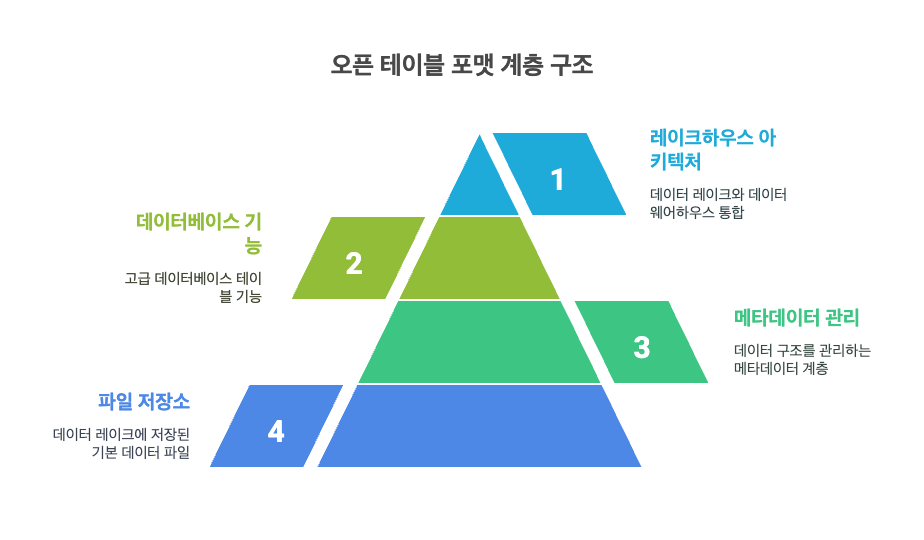
오픈 테이블 포맷(Open Table Format)은 데이터 레이크에 저장된 파일들(Parquet, ORC 등)에 메타데이터 관리 계층을 추가하여, 기존의 단순한 파일 저장소를 데이터베이스 테이블 수준의 고급 기능(ACID 트랜잭션, 스키마 진화, 타임 트래블 등)을 갖춘 관리 가능한 데이터 구조로 변환하는 오픈소스 기반의 표준화된 저장 규격입니다.
이를 통해 다양한 분석 엔진들이 동일한 대용량 데이터를 일관되고 안전하게 처리할 수 있게 되어, 데이터 레이크의 확장성과 유연성을 유지하면서도 데이터 웨어하우스 수준의 신뢰성과 관리 효율성을 제공하는 차세대 레이크하우스 아키텍처의 핵심 기술입니다.
1. 주요 오픈 테이블 포맷의 종류
Apache Iceberg Netflix에서 개발한 테이블 포맷으로, 강력한 스키마 진화와 파티션 진화 기능을 제공하며 다양한 분석 엔진(Spark, Flink, Trino 등)과의 뛰어난 호환성을 자랑합니다. 정교한 메타데이터 관리와 히든 파티셔닝을 통해 쿼리 성능 최적화에 특화되어 있습니다.
Delta Lake Databricks에서 개발한 오픈소스 프로젝트로, Apache Spark와의 긴밀한 통합을 바탕으로 스트리밍과 배치 처리를 하나로 통합하는 레이크하우스 아키텍처를 구현합니다. 상대적으로 사용이 간편하고 데이터 품질 관리 기능이 강력합니다.
Apache Hudi Uber에서 개발한 테이블 포맷으로, 실시간 데이터 수집과 처리에 특화되어 있으며 Copy-on-Write와 Merge-on-Read 두 가지 저장 방식을 제공합니다. 특히 증분 처리와 upsert 연산에 강점을 가지고 있어 CDC(Change Data Capture) 시나리오에 최적화되어 있습니다.
2. 오픈 테이블 포맷의 지원 언어 및 특징
ApacheIceberg
지원 언어: Java를 기반으로 한 코어 라이브러리가 참조 구현체이며, Scala, Python API를 제공하고 SQL을 통한 표준 쿼리 인터페이스를 지원합니다.
GitHubApache Spark, Trino, Flink, Presto, Hive, Impala 등 다양한 분석 엔진과의 뛰어난 호환성을 제공하여 멀티 엔진 환경에서 활용할 수 있습니다.
주요 특징: 히든 파티셔닝을 통해 사용자가 파티션을 직접 관리할 필요 없이 자동으로 최적화된 쿼리 성능을 제공하며, 스키마 진화 시 side-effect 없이 컬럼 추가, 삭제, 업데이트, 이름 변경을 지원합니다.
Introduction - Apache Iceberg™ 타임 트래블과 버전 롤백 기능으로 특정 시점의 데이터 상태를 재현하거나 문제 발생 시 이전 상태로 빠르게 복원할 수 있어 데이터 거버넌스와 디버깅에 유리합니다.
Delta Lake
지원 언어: Scala, Java, Python, Rust, Ruby를 지원하며, Delta Spark(Scala 구현체)와 Delta Rust API(deltalake) 두 가지 구현체를 통해 다양한 언어 생태계에서 활용할 수 있습니다.
Scaladex - delta-io / delta +2 Delta Standalone Reader를 통해 Spark 의존성 없이도 Java/Scala에서 테이블을 읽을 수 있고, Rust API를 통해 Java나 JVM 없이도 순수하게 데이터를 관리할 수 있습니다.
주요 특징: Spark, PrestoDB, Flink, Trino, Hive뿐만 아니라 Snowflake, BigQuery, Athena, Redshift 등 클라우드 데이터 웨어하우스와도 광범위하게 통합되어 하이브리드 아키텍처를 지원합니다.
GitHubDelta Delta Universal Format(UniForm)을 통해 Iceberg와 Hudi 클라이언트에서도 Delta 테이블을 읽을 수 있어 테이블 포맷 간 상호 운용성을 제공하며, Lakehouse 아키텍처 구현에 특화되어 있습니다.
Apache Hudi
지원 언어: 현재 Java, Scala, Python(PySpark)을 지원하며, HoodieJavaWriteClient를 통한 순수 Java API와 PySpark를 통한 Python 인터페이스를 제공합니다. Apache Hudi: A Deep Dive with Python Code Examples +3 C/Rust 등 다른 언어 지원은 1.0.0 버전에서 계획되어 있으며, 최근 hudi-rs 0.1.0이 공식 릴리즈되어 Rust 생태계 지원을 시작했습니다.
주요 특징: Copy-on-Write와 Merge-on-Read 두 가지 저장 방식을 제공하여 읽기 성능과 쓰기 성능 간의 트레이드오프를 선택할 수 있으며, 실시간 데이터 수집과 CDC(Change Data Capture)에 특화되어 있습니다. GitHubHarsh Daiya’s Blog Apache Kafka 커넥터와 Apache Spark/Flink와의 긴밀한 통합을 통해 스트리밍 데이터 처리와 증분 업데이트(Upsert), 삭제 연산에 강점을 가지며, 분 단위의 저지연 분석을 위한 증분 처리 프레임워크를 제공합니다.
3. 오픈 테이블 포맷별 예제
3.1. Apache Iceberg With PySpark
위 코드는 Apache Iceberg를 사용하여 직원 정보를 관리하는 간단한 데이터 레이크 예제로, 테이블 생성, 데이터 삽입/조회, 스키마 진화, MERGE 연산을 통한 업데이트까지 Iceberg의 핵심 기능들을 단계별로 보여줍니다.
Iceberg의 ACID 트랜잭션과 스키마 진화 기능을 활용하여 기존 테이블 구조를 변경하지 않고도 새로운 데이터를 안전하게 추가하고 수정할 수 있으며, SQL 기반의 MERGE 연산으로 복잡한 업데이트 로직도 간단하게 처리할 수 있습니다.
import os
import sys
import random
import decimal
import pandas as pd

from faker import Faker
from pyspark.sql import SparkSession
from pyspark.sql.functions import col, lit, current_timestamp
from pyspark.sql.types import StructType, StructField, StringType, IntegerType, DateType, DecimalType

spark = SparkSession.builder \
        .appName("iceberg_example") \
        .master("local[*]") \
        .config("spark.sql.extensions", "org.apache.iceberg.spark.extensions.IcebergSparkSessionExtensions") \
        .config("spark.sql.catalog.spark_catalog", "org.apache.iceberg.spark.SparkSessionCatalog") \
        .config("spark.sql.catalog.spark_catalog.type", "hive")\
        .config("spark.sql.catalog.local", "org.apache.iceberg.spark.SparkCatalog") \
        .config("spark.sql.catalog.local.type", "hadoop") \
        .config("spark.sql.catalog.local.warehouse", "file:///tmp/iceberg-warehouse") \
        .config("spark.serializer", "org.apache.spark.serializer.KryoSerializer") \
        .config("spark.sql.adaptive.enabled", "true") \
        .config("spark.sql.adaptive.coalescePartitions.enabled", "true")\
        .getOrCreate()

spark.sparkContext.setLogLevel("WARN")

schema = StructType([
    StructField("id", IntegerType(), False),
    StructField("name", StringType(), False),
    StructField("email", StringType(), False),
    StructField("department", StringType(), True),
    StructField("hire_date", DateType(), False),
    StructField("salary", DecimalType(10, 2), True)
])

fake = Faker()
departments = ["Engineering", "Sales", "Marketing", "HR", "Finance", "Support"]
employees = [{
        "id": i,
        "name": fake.name(),
        "email": fake.email(),
        "department": random.choice(departments),
        "hire_date": fake.date_between(start_date="-10y", end_date="today"),
        "salary": decimal.Decimal(round(random.uniform(3000, 10000), 2)) } for i in range(1, 10 + 1) ]

table_name = "local.default.employees"
warehouse_path = "/tmp/iceberg-warehouse/employees"

spark.createDataFrame(employees, schema).write.format("iceberg").mode("overwrite").saveAsTable(table_name)

employees_dataframe = spark.read.format("iceberg").table(table_name)
employees_dataframe.show()

spark.sql(f"UPDATE {table_name} SET salary = salary * 1.5 WHERE department = 'Engineering'")
employees_dataframe = spark.sql("SELECT id, name, email, department, hire_date, salary  FROM local.default.employees")
employees_dataframe.show()

spark.sql(f"DELETE FROM {table_name} WHERE department = 'Engineering'")
employees_dataframe = spark.sql("SELECT id, name, email, department, hire_date, salary  FROM local.default.employees")
employees_dataframe.show()

employees = [{
        "id": i,
        "name": fake.name(),
        "email": fake.email(),
        "department": random.choice(departments),
        "hire_date": fake.date_between(start_date="-10y", end_date="today"),
        "salary": decimal.Decimal(round(random.uniform(3000, 10000), 2)) } for i in range(11, 20 + 1)]

spark.createDataFrame(employees, schema).write.format("iceberg").mode("append").saveAsTable(table_name)

employees_dataframe = spark.sql("SELECT id, name, email, department, hire_date, salary FROM local.default.employees")
employees_dataframe.show()
3.2. Delta Lake With PySpark
이 코드는 Delta Lake를 사용하여 가상의 직원 데이터를 생성하고, 테이블 생성, 데이터 삽입, 업데이트, 삭제, MERGE 연산 등 Delta Lake의 핵심 CRUD 기능들을 순차적으로 실행하는 완전한 예제입니다.
Faker 라이브러리로 생성한 샘플 직원 데이터에 대해 SQL과 DataFrame API 두 가지 방식으로 데이터 조작을 수행하며, Delta Lake의 ACID 트랜잭션과 스키마 진화 기능을 실제로 테스트할 수 있도록 구성되어 있습니다.
import os
import sys
import random
import decimal
import pandas as pd

from delta import *
from faker import Faker

import pyspark
from pyspark.sql import SparkSession
from pyspark.sql.functions import col, lit, current_timestamp, expr
from pyspark.sql.types import StructType, StructField, StringType, IntegerType, DateType, DecimalType

spark = SparkSession.builder \
        .appName("deltalake_example") \
        .master("local[*]") \
        .config("spark.sql.extensions", "io.delta.sql.DeltaSparkSessionExtension")\
        .config("spark.sql.catalog.spark_catalog", "org.apache.spark.sql.delta.catalog.DeltaCatalog") \
        .config("spark.sql.warehouse.dir", "/tmp/delta-warehouse") \
        .config("spark.sql.catalog.local.warehouse", "/tmp/delta-warehouse") \
        .config("spark.sql.catalogImplementation", "hive") \
        .config("javax.jdo.option.ConnectionURL", "jdbc:derby:/tmp/ive-metastore;create=true")\
        .config("spark.sql.debug.maxToStringFields", "100") \
        .config("spark.sql.catalog.local.type", "hadoop") \
        .config("spark.serializer", "org.apache.spark.serializer.KryoSerializer") \
        .config("spark.sql.adaptive.enabled", "true") \
        .config("spark.sql.adaptive.coalescePartitions.enabled", "true")\
        .getOrCreate()

spark.sparkContext.setLogLevel("WARN")

schema = StructType([
    StructField("id", IntegerType(), False),
    StructField("name", StringType(), False),
    StructField("email", StringType(), False),
    StructField("department", StringType(), True),
    StructField("hire_date", DateType(), False),
    StructField("salary", DecimalType(10, 2), True)
])

fake = Faker()
departments = ["Engineering", "Sales", "Marketing", "HR", "Finance", "Support"]
warehouse_path = "/tmp/delta-warehouse"
table_name = "employees"

spark.sql(f"DROP TABLE IF EXISTS {table_name}")

spark.createDataFrame( [{
        "id": i,
        "name": fake.name(),
        "email": fake.email(),
        "department": random.choice(departments),
        "hire_date": fake.date_between(start_date="-10y", end_date="today"),
        "salary": decimal.Decimal(round(random.uniform(3000, 10000), 2)) } for i in range(1, 10 + 1) ], schema).write.format("delta").saveAsTable(f"{table_name}")

employees_dataframe = spark.read.format("delta").load(f"{warehouse_path}/{table_name}")
employees_dataframe.show()

spark.sql(f"UPDATE {table_name} SET salary = salary * 1.5 WHERE department = 'Engineering'")
employees = spark.sql(f"SELECT id, name, email, department, hire_date, salary FROM {table_name}")
employees.show()

employees = DeltaTable.forPath(spark, f"{warehouse_path}/{table_name}")
employees.update(condition = expr("id % 2 == 0"), set = { "id": expr("id + 100") })
employees.toDF().show()

employees.delete(condition = expr("id % 2 == 0"))
employees.toDF().show()

new_employees = [{
        "id": i,
        "name": fake.name(),
        "email": fake.email(),
        "department": random.choice(departments),
        "hire_date": fake.date_between(start_date="-10y", end_date="today"),
        "salary": decimal.Decimal(round(random.uniform(3000, 10000), 2)) } for i in range(1, 10 + 1) ]

new_employees = spark.createDataFrame(new_employees, schema)
employees.alias("oldData").merge(new_employees.alias("newData"),"oldData.id = newData.id").whenMatchedUpdate(set = { "id": col("newData.id") }).whenNotMatchedInsert(values = { "id": col("newData.id") }).execute()
employees.toDF().show()
3.3. Hudi With PySpark
import os
import sys
import random
import decimal
import pandas as pd

from faker import Faker

from pyspark.sql.functions import col, lit, current_timestamp, expr
from pyspark.sql.types import StructType, StructField, StringType, IntegerType, DateType, DecimalType

schema = StructType([
    StructField("id", IntegerType(), False),
    StructField("name", StringType(), False),
    StructField("email", StringType(), False),
    StructField("department", StringType(), True),
    StructField("hire_date", DateType(), False),
    StructField("salary", DecimalType(10, 2), True)
])

fake = Faker()
departments = ["Engineering", "Sales", "Marketing", "HR", "Finance", "Support"]
warehouse_path = "/tmp/hudi-warehouse"
table_name = "employees"

hudi_options = {'hoodie.table.name': table_name, 'hoodie.datasource.write.partitionpath.field': 'department'}

spark.createDataFrame( [{
        "id": i,
        "name": fake.name(),
        "email": fake.email(),
        "department": random.choice(departments),
        "hire_date": fake.date_between(start_date="-10y", end_date="today"),
        "salary": decimal.Decimal(round(random.uniform(3000, 10000), 2)) } for i in range(1, 10 + 1) ], schema).write.format("hudi").options(**hudi_options).mode("overwrite").save(f"{warehouse_path}/{table_name}")

        employees = spark.read.format("hudi").load(f"{warehouse_path}/{table_name}")
employees.createOrReplaceTempView("employees_table")
spark.sql("SELECT id, name, email, department, hire_date, salary FROM  employees_table WHERE salary > 20.0").show()

employees_update = spark.read.format("hudi").load(f"{warehouse_path}/{table_name}").filter("department == 'Sales'").withColumn("salary", col("salary") + 100)
employees_update.write.format("hudi").options(**hudi_options).mode("append").save(f"{warehouse_path}/{table_name}")

employees_delete = spark.read.format("hudi").load(f"{warehouse_path}/{table_name}").filter("department == 'Sales'")
hudi_hard_delete_options = {'hoodie.table.name': table_name, 'hoodie.datasource.write.partitionpath.field': 'department', 'hoodie.datasource.write.operation': 'delete',}
employees_delete.write.format("hudi").options(**hudi_hard_delete_options).mode("append").save(f"{warehouse_path}/{table_name}")

spark.read.format("hudi").load(f"{warehouse_path}/{table_name}").show(100)
최신 기능과 최고 성능을 원하는 환경에서는 Apache Spark 3.5를 기반으로 Apache Iceberg 1.9.1, Delta Lake 3.3.1, Apache Hudi 1.0.2를 사용하는 것이 권장되며, 이 조합에서 각 테이블 포맷의 최신 기능과 성능 최적화를 모두 활용할 수 있습니다.
안정성과 검증된 환경을 우선하는 프로덕션 시스템에서는 Apache Spark 3.4를 기반으로 Apache Iceberg 1.9.1, Delta Lake 2.4.x, Apache Hudi 1.0.2를 선택하는 것이 안전하며, 이는 충분한 검증을 거친 안정적인 조합입니다.
여러 테이블 포맷을 동시에 사용하는 멀티 포맷 환경을 구축할 때는 Apache Spark 3.4 또는 3.5를 선택하면 모든 오픈 테이블 포맷이 완전히 호환되므로, 프로젝트 요구사항에 따라 적절한 테이블 포맷을 유연하게 선택하여 사용할 수 있습니다.